
MKeepalive
ATTENTION:
This product is outdated! Support
for this product has been stopped.
If this product was a beta
product may documentation, installer and/or features are missing.
MKeepalive
Summary
This program makes sure that your internet connection is not closed due to inactivity. In order to achieve this, the program asks for web pages in a definable interval. You can edit the list of pages which be will requested. A special feature is that you can control the program via command line and via a telnet client! So it's ideal to use in batch files.
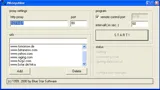 This program makes sure that your internet connection is not closed
due to inactivity. In order to achieve this, the program asks for
web pages in a definable interval. You can edit the list of pages
which be will requested. A special feature is that you can control
the program via command line and via a telnet client! So it's ideal
to use in batch files.
This program makes sure that your internet connection is not closed
due to inactivity. In order to achieve this, the program asks for
web pages in a definable interval. You can edit the list of pages
which be will requested. A special feature is that you can control
the program via command line and via a telnet client! So it's ideal
to use in batch files.
Features
- Support of a HTTP-Proxy
- Definable time interval
- Access via a telnet client
- You can edit the list of web pages which will be requested
- State of the program is visible via the systray icon.
Parameters
| MKeepAlive | Without any parameter the program is waiting to be activated. Once the program is started you can control it via the command line or a telnet client. | |
| MKeepAlive | <server adresse> | IP or name of the computer on which MKeepAlive is running |
| <Portnummer> | Port where the MKeepAlive server is running. | |
| <[enable] / [disable]> | The Command "enable" to enable the keepalive function, "disable" to disable the function. |
Examples
MKeepAlive 192.168.6.2 6106 enableMKeepAlive myhome.testdomain.com 6106 disable
Download
Latest Version: MKeppalive
 Latest Version: